microsoft.public.windowsxp.wmi
WMI on Windows XP.
The XP-specific room for Windows Management Instrumentation: repository corruption and its ritual repairs, WMI filters for Group Policy, scripting the Win32_* classes, and the divergences between XP and Server 2003 that consumed administrator afternoons.
Like the rest of microsoft.public.*, it ran on msnews.microsoft.com with MVPs answering until the 2010 retirement to web forums.
On this page
- The paperwork that never existed
- One paragraph of plumbing, and where the rest of it lives
- The scripting stack, from the administrator's side
- Three moves and a loop: what a working script looked like
- Identity, or the question of who the script is
- WMIC, and the answer that fitted on one line
- The literature this room was the appendix to
- What administrators actually built with it
- The register of the room
- WMI filters for Group Policy
- The management products downstream
- Why the remote query failed
- The repository, and the rituals around it
- The cost of a careless query
- The service packs, and the day remote management stopped
- The lifecycle that emptied the room
- The succession: PowerShell
- What still works, and what does not
- What the record does not show
- Scope and limits of this page
The paperwork that never existed
The first thing to say about this newsgroup is the thing that cannot be said about most of the groups in this directory: nobody voted for it. microsoft.public.windowsxp.wmi belonged to a vendor hierarchy, carried on a news server that Microsoft owned and ran, and vendor hierarchies do not hold elections. There is no Request for Discussion in the archives of news.announce.newgroups, no Call for Votes, no votetaker's tally and no RESULT posting, because none of those documents was ever produced. A room in this namespace existed when a product group at Microsoft decided a room should exist, and it stopped existing when the company stopped feeding the server. Readers arriving from a Big-8 page and expecting the usual paper trail should adjust their expectations rather than go looking; the trail is not lost, it was never laid.
What can be established comes from the ordinary plumbing of Usenet rather than from any Microsoft record. The Internet Systems Consortium's mirrored copy of the active file — the list from which a news administrator's server learns which groups it carries — still holds the name, and it fixes the group's position exactly. microsoft.public.windowsxp.wmi is one of twenty-six groups beneath microsoft.public.windowsxp. Its siblings are the subsystems of one operating system: accessibility, basics, customize, embedded, games, general, hardware, help_and_support, messenger, moviemaker, music, network_web, newusers, perform_maintain, photos, print_fax, security_admin, setup_deployment, video, winlogo and work_remotely, together with two beta rooms, a device-driver room for developers and a configuration_manage room. Every one of the twenty-six is flagged in that file as an ordinary unmoderated group that accepts posting. Sorted, Windows Management Instrumentation falls between the room for the Windows logo programme and the room for working remotely, which is a fair indication of how the namespace thought about it: not as a technology with a constituency, but as one more thing that could go wrong with Windows XP.
The companion newsgroups file — the descriptive list from which newsreaders build a browsable index — is even blunter. Each of the twenty-six windowsxp groups, this one included, carries the same four-word description: Microsoft Windows XP newsgroup. That is the whole of the surviving charter in the standard record. It is worth setting beside the entry for microsoft.public.wmi.programmer, a room filed under the technology's own name rather than under a product, which gets the description Microsoft Windows Management Instrumentation newsgroup. The namespace could describe a room by its technology when it chose to. For this room it chose the operating system, and the choice is the group's identity in one line.

WMI in fact drew four rooms in this hierarchy, under four different parents, and the division of labour is the reason this page exists as one of three. microsoft.public.win32.programmer.wmi was filed among the Win32 API areas and took the native-code traffic: the COM interfaces, the Managed Object Format files that put class definitions into the repository, and the writing of providers, including providers living inside device drivers. microsoft.public.dotnet.framework.wmi took the managed route in, by way of the System.Management namespace, and drew developers holding a compiler. microsoft.public.wmi.programmer took the name of the technology itself. This room took the people who were not programmers at all: administrators with a fleet of machines, a text editor, and a question that began with the word why.
The infrastructure underneath all four was msnews.microsoft.com, a public NNTP server that anyone could read without an account and post to without a subscription. Articles lived there for about ninety days and then went — Microsoft's own farewell notice put the figure at ninety days flat — which means the company never held an archive of its own hierarchy worth the name. That arrangement, the volunteers who did most of the answering, and the manner of its ending are set out at length on the page for microsoft.public.word.numbering and are not retold here. The dates belong on this page, though, because they are what closed the room. Microsoft's own announcement, still readable in web archives as it stood in August 2010, states the position plainly: the company was then hosting more than 2,000 public newsgroups along with more than 2,200 private ones, and beginning in June 2010 it would start closing them and migrating users to its web forums — Microsoft Answers for consumers, TechNet and MSDN for professionals and developers. The closure was staged, taking the lowest-volume rooms first, with notice posted inside each affected group ahead of its own end date; the whole exercise was to be finished by autumn 2010.
The names, however, were never withdrawn. Nobody issued the control messages that would delete them, so a news administrator installing a current group list in 2026 still creates all twenty-six of the windowsxp rooms, this one among them, open and postable, for a support service that shut in 2010. What that survival does and does not signify is the subject of the hierarchy's own page at microsoft.public.*.
One paragraph of plumbing, and where the rest of it lives
Enough architecture to follow the operational material, and no more. Windows Management Instrumentation is Microsoft's implementation of the Distributed Management Task Force's Web-Based Enterprise Management standards and of the Common Information Model beneath them: a scheme in which every manageable thing on a machine — a disk, a service, a running process, a line in the event log — is an instance of a class with named properties and methods. Class definitions live in a repository under the system's WBEM directory, compiled there from Managed Object Format files that ship in the same directory. Components called providers answer for particular classes, supplying instances on demand. The whole is brokered by a Windows service, and classes are grouped into namespaces, of which the one an administrator wanted almost every time was root\cimv2. Questions are asked in WQL, a query language shaped like SQL — a SELECT, a FROM naming a class, an optional WHERE — with no joins and a restricted set of operators.
The technology was older than the operating system this room was named for, which is part of why the room could open already fluent. WMI appeared in the late 1990s, first as an out-of-band download in the Windows NT 4.0 Service Pack 4 era and separately for Windows 95 and Windows 98, and it became a preinstalled component of Windows from Windows 2000 onwards. By the time Windows XP reached the desk it was not something an administrator installed or chose. It was already there, on every machine, waiting to be asked.
That is the whole of it for present purposes. The repository, the MOF language and the business of writing a provider are treated properly on the win32.programmer page; the standard itself, the managed wrapper over the object model and the .NET rooms of msnews are treated on the dotnet.framework page. What follows here is the other trade: not the people who extended WMI, but the far larger number who consumed it from a command prompt at half past six on a Friday.
The scripting stack, from the administrator's side
The group's working language was settled before the group opened. VBScript had been installed by default in every desktop release of Windows since Windows 98, and in Windows Server since the Windows NT 4.0 Option Pack; the host that ran it, the Windows Script Host, had followed the same path from optional extra on Windows 95 to standard component of Windows 98 and everything after, arriving as well with Internet Explorer 5. Microsoft's own documentation described the Windows Script Host, with no embarrassment, as an administration tool. By the time Windows XP shipped, this was not a technology choice an administrator made. It was a property of the machines.
The host is language-independent in principle: it loads an Active Scripting engine and hands the script to it, and engines existed for Perl, Python, Rexx, Tcl, PHP, Ruby, Object Pascal and a good many others. In practice two engines shipped in the box — VBScript for .vbs files and JScript for .js — and a Windows Script File in .wsf could combine jobs written in more than one. In this room, and in the literature it grew alongside, VBScript won by such a margin that the alternatives are historical curiosities. It was verbose, it was forgiving, and it read like something an administrator could modify without understanding, which is exactly what an administrator wanted at six on a Friday.
The host presents itself as two executables and the choice between them mattered more than it looks. wscript.exe is the windowed host: output arrives as a dialogue box with an OK button, which is fine for a script a person is watching and disastrous for a script nobody is watching, since a modal dialogue on an unattended server will wait patiently for ever. cscript.exe is the console host, and it is what fleet work used. Microsoft's own procedure for its documented script examples is to save the code in a file with a .vbs extension, open a command prompt, navigate to the directory and type cscript followed by the file name; the accompanying note, that WMI scripts can produce large amounts of output and that the output should therefore be redirected to a file, is the entire operational pattern of this group in one sentence. A script produced text; the text went into a file; the file went into a spreadsheet; the spreadsheet went to whoever had asked the question.
Where the script ran from was the other half of the arrangement, and it had two canonical answers. The first was the logon script: from Windows 2000 onwards the Windows Script Host could be used for user logon scripts, which meant a .vbs file assigned through the domain would execute on every workstation as its user signed in — on the machine, as the user, at a moment when the machine was demonstrably switched on. The second was the scheduled task, configured on an administrator's workstation or a designated server, running overnight against a list of machine names. The two contexts look similar and behave nothing alike, and the difference between them supplied this room with a permanent seam of traffic, for reasons taken up below.
Windows XP brought two changes to the stack that were security decisions rather than scripting ones. The version of the Windows Script Host that shipped with it could sign scripts programmatically through a Scripting.Signer object, given a valid certificate on the system; and Software Restriction Policies, introduced with XP, let an administrator configure a machine to execute only scripts stored in trusted locations, matching a known hash, or signed by a trusted publisher. Both were answers to the obvious objection to a scripting host installed by default on every desktop in the world, which is that malware also runs on Windows. Neither materially changed how administrators wrote scripts. Both changed what an administrator had to arrange before a script would run on a locked-down estate, and that is an operational fact of a kind newsgroups are unusually good at transmitting.
Three moves and a loop: what a working script looked like
Structurally the canonical WMI script in this room is three moves long, and it is worth setting out precisely because the whole of the group's traffic is variations on it. First, a call to GetObject with a moniker string that names the WMI service; the call returns an object representing a connection to one namespace on one machine. Second, a call to that object's ExecQuery method with a WQL query, which returns a collection. Third, a For Each loop over the collection, reading named properties off each item and echoing them. That is it. Microsoft's own worked examples in the WMI documentation are built on exactly this skeleton, with a variable holding the computer name set to a full stop for the local machine.
The moniker is the part that repaid study, because it is where every interesting decision was encoded as text. In its simplest documented form it is the string winmgmts: followed by a namespace path; add a computer name and the same string becomes a remote connection. The form that appears throughout the documentation and throughout the literature of the period reads winmgmts:{impersonationLevel=impersonate}!\\COMPUTER\root\cimv2 — a security setting in braces, an exclamation mark, two backslashes, a machine name, and a namespace. Microsoft's guidance is that the namespace should be stated explicitly rather than left to default, on the sensible ground that the default namespace may not be the same on every machine and a fleet script should ask the same question of all of them.
ExecQuery takes optional arguments after the query, and one of them acquired a life of its own. The documented examples pass the value 48, which is the sum of two documented flags with the values sixteen and thirty-two: return immediately, and forward only. The first makes the call semi-synchronous, so the script begins receiving results rather than waiting for the whole set; the second returns a forward-only enumerator, which in Microsoft's own description is generally much faster and uses less memory than the conventional kind, at the price of a collection whose members cannot be cloned and which is walked through once. On a query returning a handful of rows the flags are decoration. On a query enumerating every Plug and Play device on a machine over a slow link — which is, as it happens, the example Microsoft chose to illustrate querying a list of remote machines — they are the difference between a script and a hang, which is why the number 48 appears, unexplained, in a great deal of copied code from this period, including copies made by people who could not have said what it meant.
It is worth recalling what this idiom displaced, because the group's tolerance for verbosity only makes sense against the alternative. The previous generation of Windows automation ran on batch files and resource-kit utilities: single-purpose executables whose output a script captured as text and parsed by column position or by delimiter, differently for each tool, and differently again after each revision of each tool. WMI offered the opposite bargain. One connection syntax, one query language, and structured results with named properties, covering hardware, services, processes, event logs and third-party instrumentation alike. Learning three lines of VBScript bought access to all of it. The trade was verbosity for uniformity, and the fleet-management scripts of the period were the interest paid on that trade.
Identity, or the question of who the script is
Every WMI call executes as somebody, and this is the single subject that generated the most durable confusion in a room full of otherwise competent people. It is not that the rules were secret. It is that the failures never said which rule had been broken.
Two settings ride on every connection. The impersonation level says how far the WMI service on the target machine may act on the caller's behalf; the value administrators wanted, and the one baked into the standard moniker string, is Impersonate, meaning the service may use the caller's credentials to do the work. The authentication level says how much protection the traffic itself gets, running from none up to packet privacy, which encrypts the data as it crosses the network. Both are settable in three places — inside the moniker string, on the security object hanging off a connection, or as parameters to a connection call — and the multiplicity of places is itself a source of trouble, since a setting applied in one of them does not necessarily survive a code path that reaches the connection by another.
The documented default for a connection to WMI on the local computer is packet privacy. For a remote connection the requirement belongs to the target, not to the caller: a namespace can be configured to require an encrypted connection before it will return anything, and a client attempting a lower authentication level than the namespace permits receives an access-denied message rather than an explanation. Microsoft's guidance is to set the authentication level to packet privacy whether or not the namespace demands it, which is good advice and was, in a room where most scripts were copied from a worked example, unevenly followed.
The moniker handles the common case, which is a connection to another machine using the credentials the administrator is already logged on with. For anything else — a different user name, a different password, a machine in another domain — the moniker is not enough, and the script has to create a locator object and call its ConnectServer method, passing the machine, the namespace, a user name and a password, and optionally a locale and an authority string naming the domain to authenticate against. The impersonation level is then set separately on the security object of the resulting connection. That structural difference — simple moniker for the ordinary case, locator object for the awkward one — is the shape of an enormous number of answers posted in this room.
Four constraints on the ordinary case are documented, and between them they account for a great deal of the group's traffic. The caller must be an administrator on the target machine. The account the caller is logged on with must have a password; a blank password is a Windows security condition that stops the connection outright. Both machines should be in the same domain, or the script must supply credentials explicitly. And — a detail that reliably surprised people — supplying alternative credentials for a connection to the local machine is not permitted at all: a script that works against the machine down the corridor by passing a user name and password will refuse to do the same thing against the machine it is running on.
From those rules follows the classic asymmetry of threads in this room, which any administrator of the period will recognise on sight. The script works when it is run by hand at the desk, and fails when the same script runs at two in the morning from a scheduled task, under a service account nobody has thought about in a year, on a machine whose namespace permissions were tightened by somebody else in a different quarter. Impersonation settings, namespace permissions and the plain difference between being logged on and being authorised supplied a permanent traffic stream, not because the concepts are hard but because the error is the same error whichever of them is at fault.
One further connection setting deserves mention because it solves a problem every fleet script hits. A machine that is switched off does not refuse a connection; it simply fails to answer, and a script walking a list of several hundred names will stall on each dead one until the network stack gives up. The documented remedy is a connect flag — value 128 — that imposes a two-minute timeout on the connection call. Two minutes is not fast, but it is finite, and the difference between finite and infinite is the difference between a report on somebody's desk at nine and an explanation at ten.
WMIC, and the answer that fitted on one line
Windows XP added something its predecessors had lacked: a command-line front end to WMI that shipped in the box. WMIC, the WMI command-line utility, was available on Windows versions from XP onwards, and its purpose was to let a person interrogate the instrumentation without writing, saving or running a script at all. For this group's traffic that mattered twice over. It gave the script-averse a way to do a respectable share of the work, and it gave the regulars a way to talk somebody through a diagnostic step in a single quotable line — which is a very different rhetorical act from posting thirty lines of VBScript and asking a stranger to save them as a file.
The design is three-layered and worth describing, because it explains why the one-liners look nothing like the scripts. An alias is a friendly renaming of a class, property or method: type os, or service, or process, or environment, and WMIC translates it into the underlying WMI class and a sensible set of properties. A verb follows the alias and says what to do: LIST to show data, which is the default verb; GET to retrieve named properties; CALL to execute a method on the matching instances; SET to assign property values; CREATE and DELETE for instances; ASSOC to walk the associations from an object to whatever is related to it. LIST takes adverbs — BRIEF for the core properties, FULL for the full set and the default, INSTANCE for paths alone, STATUS, SYSTEM. And a WHERE clause between alias and verb narrows the set, so that a request to start a service reads as a sentence about services rather than as code.
Round the outside sit the global switches, and this is where WMIC stops being a convenience and becomes a fleet tool. /NODE takes a comma-delimited list of computer names — or, prefixed as the documentation specifies, the name of a file containing them, comma delimited or one per line — and runs the command synchronously against all of them. /USER and /PASSWORD supply credentials for those machines, with the documentation noting drily that the password is visible at the command line, and noting too that a user name cannot be used against the local computer, which is the same rule the scripting interface enforces. /IMPLEVEL and /AUTHLEVEL expose the same impersonation and authentication settings the moniker string encodes, and /LOCALE and /PRIVILEGES the rest of the connection context. /OUTPUT and /APPEND redirect everything to a file, or to STDOUT, or to the clipboard. /RECORD writes the whole session to XML, and /TRACE reports the success or failure of every function used along the way. /AGGREGATE decides whether results from a set of machines appear as they arrive or only when every machine has answered or timed out. And /FAILFAST pings the machines named in /NODE before sending them anything, skipping the ones that do not respond — the same dead-machine problem the scripts solved with a timeout flag, solved here by simply asking first.
A second tier of switches attaches to the verb rather than to the session. /FORMAT names a key word or an XSL file to shape the output; /TRANSLATE runs the result through a named translation table, with BasicXml and NoComma supplied for the purpose; /VALUE and /ALL choose between one property to a line and a table; and /EVERY repeats a LIST or a GET at an interval given in seconds, turning a query into a crude monitor. Two escape hatches complete it. CLASS steps out of alias mode to address a WMI class by its real name, and PATH does the same for instances, so that anything the aliases do not cover is still reachable. That combination — a friendly vocabulary for the common cases and a documented way out of it for everything else — is why WMIC one-liners circulated as freely as they did. They were quotable, they were short enough to survive being retyped from a screen, and they did not require the recipient to own any code.
The literature this room was the appendix to
Microsoft was teaching this idiom deliberately, and at a scale that is easy to forget now that the sites have been reorganised out of existence. The TechNet Script Center was a documentation property aimed squarely at administrators who scripted rather than at programmers who developed, and a capture of its front page from the first days of January 2007 reads like an inventory of everything this group's members were expected to have to hand. A Script Repository with a browse-by-category index. A Scripting Guide. A page of Scripting Tools. A Community-Submitted Scripts Center. A set of Remote and Multiple Computer Templates — boilerplate for exactly the fleet work described above. Scripting-for hubs by subject, one of them for Windows PowerShell, which by then had been shipping for six weeks. The Windows 2000 Scripting Guide, still in the quick links more than five years after that operating system's successor arrived. An e-mail address, scripter at microsoft.com, for questions. And, in the corner reserved for morale, Doctor Scripto's Fun Zone, a weekly scripting puzzle and a weekly scripting comic strip.
The columns did the day-to-day teaching. Hey, Scripting Guy!, written by a Microsoft team styled the Scripting Guys, answered one small administrative question at a time and went on doing it for years; the same front page also carried a column called Sesame Script, whose instalment that month was, in the site's own summary, all about the WMI Query Language and how to get exactly the information you want out of WMI. The blog survives today as a read-only archive on Microsoft's developer site, its front page announcing that the Hey, Scripting Guys! blog has been retired and is kept for historical reference, with new material going to a PowerShell community blog instead. That notice is a fair epitaph for the whole apparatus.
The Scripting Guys also shipped tools, and the tools are half the explanation for what the group's opening posts looked like. Scriptomatic, described on the Script Center's own tools page in exactly the register the site favoured — this world-famous tool writes WMI scripts so you don't have to — presented a list of WMI classes and generated, for whichever one was selected, a complete script that connected, queried and enumerated every property of that class. The original version wrote VBScript; Scriptomatic 2.0 kept the first one on the page for sentimental reasons and added Perl, Python and JScript output along with several formats for the results, from plain text to a web page to XML. Beside it stood an ADSI Scriptomatic for directory work; Tweakomatic, which wrote WMI scripts for retrieving and configuring Windows and Internet Explorer settings; Log Parser 2.2, offering query access to text-based data files, the Windows event log and the registry among other things; an HTA Helpomatic for people writing HTML Applications; a Portable Script Center packaging the repository as a help file; a Do-It-Yourself Script Center Kit for running a copy of the whole thing internally; and the WMI Code Creator, which generated VBScript, C# or Visual Basic .NET for querying data, calling a method or receiving event notifications.
The consequence for this room is structural rather than anecdotal. When a generator can produce a correct enumeration of any class on demand, the questions that reach a newsgroup are precisely the ones the generator cannot answer: the modification, the filter, the second machine, the property that came back empty. The group functioned as the interactive appendix to that literature — the place where a worked example met a production estate and the gap between them became somebody's evening. The language itself had a room of its own at microsoft.public.scripting.vbscript; what distinguished this one is that the VBScript was incidental and the class name was the point.
What administrators actually built with it
The traffic only makes sense against the jobs. Windows XP arrived in businesses by the fleet, and a great many of the administrators responsible for hundreds or thousands of near-identical machines had no budget for a commercial management suite and no prospect of getting one. WMI was already installed on every one of those machines, it was queryable across the network, and it cost nothing. The recurring shapes of the group's threads map onto a short list of standing chores.
- Inventory. Walk a list of machine names; on each, query a handful of classes — the BIOS for version and serial number, the computer system for manufacturer and model and memory, the logical disks for size and free space, the operating system for edition and service pack, the quick-fix engineering class for installed hotfixes; write the lot to a delimited text file. An asset register assembled by script, at a time when the alternative was a clipboard and a fortnight.
- Remote interrogation. Query a misbehaving machine's processes, services and event-log entries from the administrator's own desk, without walking to it and without disturbing whoever was sitting at it.
- Service monitoring. Check the state of a named service across a set of servers, restart what had stopped, and report what had been restarted. WMIC could do the same thing in one line with a WHERE clause and a CALL.
- Patch and hotfix reporting. Answer, for a named update, which machines have it — the question that arrives from somebody senior on the morning after a security bulletin, and one that WMI answered across a domain without a purchase order.
- Logon-script logic. Branch a logon script on what WMI reported about the machine it was running on: operating system version, free memory, chassis type, whether the thing was a desktop or a laptop — a distinction Microsoft's own task documentation offers as its opening example. One script, an unequal estate.
- Eventing. Subscribe to notifications — a process starting, a device arriving, free space crossing a threshold — and act on them. This was the ambition that produced the group's most intricate failures, and the one whose mechanics belong to the win32.programmer page rather than to this one.
Behind the list sits one enormous practical fact, and it is the honest answer to why this group existed. In an XP-era Windows estate without a purchased management product, a WMI script was the standard way to answer the question what is actually installed on these machines — not what the deployment image contained, not what the purchase order said, but what was on them now. Every organisation of any size has that question, it recurs, and the answer decays. The instrumentation was the only thing on the network that knew.
The operational texture recurs across the record even where the tasks differ. Scripts ran from an administrator's workstation or a designated server, usually overnight. Machine lists came from the domain or from a plain text file maintained by hand, and the hand-maintained list was always slightly wrong. Results went to text files destined for a spreadsheet, because a spreadsheet was what management read. Machines that were switched off had to be dealt with before they were queried rather than after. And the register of the group's threads was never how does WMI work; it was, invariably, some version of this worked yesterday on nineteen machines and failed on the twentieth.
The register of the room
What separated this room from its three siblings was not subject matter but register, and the distinction is worth stating because it is the most useful thing a directory page can tell a reader deciding whether an archived thread is likely to help. The dotnet room argued about object models and the win32 room about COM plumbing and provider authorship. Here the poster wanted the printer inventory by Friday. Threads in a room of this kind are named for a symptom — an error code, a blank result, a script that hangs — rather than for a concept, and the characteristic exchange is concrete to the point of bluntness: a pasted script that does not work, and a reply containing the same script with a line or two on what was changed and why. It is correction as pedagogy, and it suits people who learn by comparing two versions of a file.
The request for a one-liner was its own minor genre, and WMIC is why it could exist: not a script but a single invocation, asked for by administrators who did not want to own code, only to run it. None of this is a claim about any identified thread, and no thread from this group is quoted or named anywhere on this page. It is a description of a genre of support traffic, offered as such, and a reader who finds the archived threads elsewhere can check it in a few minutes. What can be said with more confidence is the staffing: like the rest of its hierarchy, the group sat on a server Microsoft owned but was answered largely by volunteers, among them the practitioners the company formally recognised for exactly that unpaid work. Peer support wearing a corporate domain name is the accurate description, and for the better part of a decade it held.
WMI filters for Group Policy
One adjacent system deserves a section of its own, because it took WQL out of the scripting host and wired it into the machinery that configured every machine in a domain. A WMI filter in Group Policy is a query, or a set of queries, attached to a Group Policy object; the filter is evaluated on the target computer when policy is applied, and if it returns false the policy object is not applied to that machine. It let an administrator scope policy by what a machine actually was rather than by where somebody had filed it in the directory.
The mechanics as documented for the Group Policy Management Console are specific enough to be worth stating. The queries are written in WQL and run against a named namespace, with root\CIMv2 the default and the right answer for nearly everything. A filter may contain more than one query, combined with logical operators, and all of them must be true for the linked policy object to apply. A filter is a directory object separate from the policy object; it is linked to one, and the same filter may be linked to many, but each policy object may carry only one filter. Filters are stored per domain, and a filter and the policy object it is linked to must live in the same domain.
Two limitations shaped who could use the feature, and both are era-defining. Client-side support for WMI filters existed only on Windows XP, Windows Server 2003 and later: a Windows 2000 client encountering a filtered policy object ignores the filter entirely and applies the policy regardless — which is to say that in a mixed estate a filter was not a safety mechanism but a hint, and the machines most likely to be misconfigured were the ones least likely to obey it. And the filters themselves required at least one Windows Server 2003 domain controller in the domain; in an environment of Windows 2000 domains alone the console did not even show the node. Both facts made the feature an artefact of exactly the migration years this newsgroup lived through.
Microsoft's own documentation supplies the worked examples, and they read as a catalogue of what administrators wanted policy to depend on: a query against the time-zone class with a numeric bias, to apply policy only to servers on one seaboard; a query against the quick-fix engineering class for a named hotfix; a query against the operating system class matching a caption of Microsoft Windows XP Professional, to exclude everything else; a query against the logical disk class for a free-space threshold expressed in bytes, with network connections excluded; a query against the computer system class for a manufacturer and two model names, to target one line of laptops; and — a choice that will look less innocent by the end of this page — a query against the installed-product class, to assign software only where one of two packages was already present. Written out, they are unremarkable. Debugged at a distance they are anything but, because a mistaken filter does not announce itself: policy simply stops arriving, on some machines, for a reason that requires debugging Group Policy and WQL simultaneously and which will not reproduce on the administrator's own workstation.
The management products downstream
The scripts were the visible half. The other half is that a whole tier of commercial software was quietly reading the same instrumentation, and an administrator who understood WMI understood something about all of it. Microsoft's own systems-management line is the clearest case. Systems Management Server began in 1994 alongside Windows NT Server 3.5; version 2.0 arrived in 1999 with Y2K remediation as its selling point; SMS 2003 followed in 2003, squarely in the years in which such groups were busiest; and in 2007 the product was renamed System Center Configuration Manager. Throughout, its hardware inventory read from Windows clients using WMI, and the mechanism was exposed to the administrator rather than hidden: in the SMS-era products the set of classes collected was defined in a file named sms_def.mof on the site server, which an administrator edited to enable or disable existing classes and to create new ones to inventory. Extending the inventory meant extending the schema, which meant understanding the same MOF and namespace vocabulary that this newsgroup argued about.
The pattern held beyond Microsoft. Management suites of the period consumed WMI as a data source — Microsoft Operations Manager on the monitoring side, HP's OpenView, IBM's Tivoli, and offerings from BMC and CA among them — and hardware vendors wrote providers for their own equipment so that their kit would answer questions in the same vocabulary as everything else. The growth of the shipped provider set tracks the ambition: the original Windows NT 4.0 package carried fifteen providers, Windows 2000 shipped with twenty-nine, Windows Server 2003 came with roughly eighty, and Windows Vista added thirteen more to reach about a hundred. By the middle of the decade WMI was not an optional extra bolted to Windows management; it was the floor that Windows management stood on.
The operating system itself joined the list of consumers during this group's lifetime. From Windows XP Service Pack 2 onward, the Security Center that greeted every user with a shield in the notification area obtained the status of third-party antivirus and firewall products through WMI. A subsystem that most home users never knowingly touched was, from 2004, the thing telling them their antivirus had expired.
Why the remote query failed
A support group's true signature is not what it celebrates but what it keeps having to explain, and for this room that was remote access. A local WMI query is a call into a service on the same machine. A remote one traverses DCOM, which traverses remote procedure call, which traverses authentication — and every layer can refuse, in its own vocabulary, without saying which layer refused. What arrived in the newsgroup was a hexadecimal number.
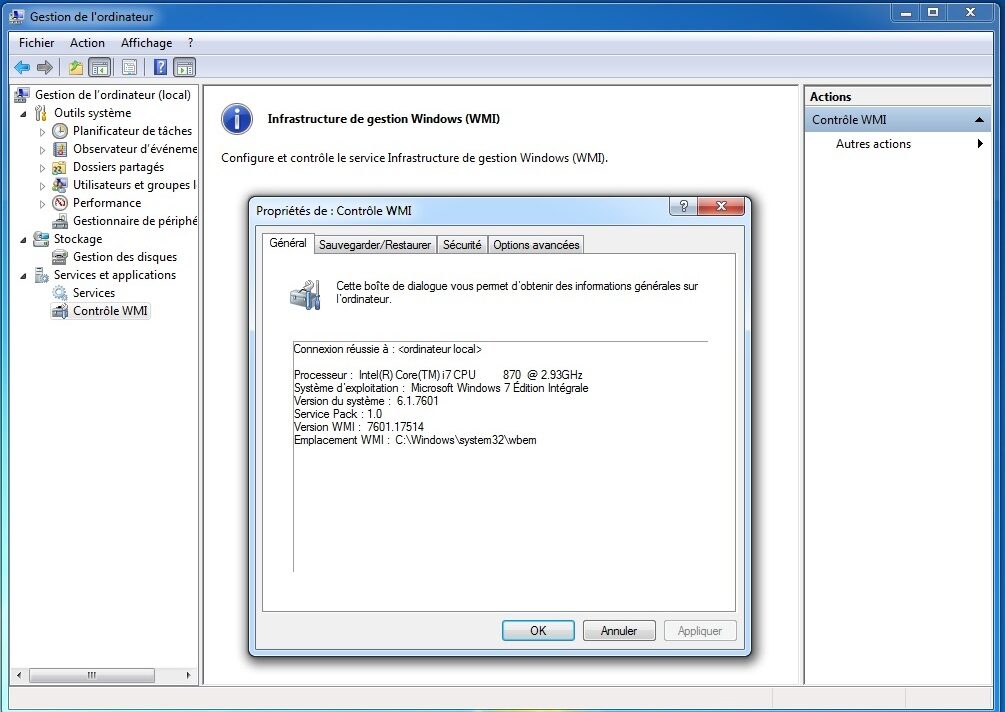
Three numbers account for most of them, and Microsoft's own troubleshooting documentation sorts them into exactly three categories. 0x800706BA is the RPC server being unavailable: either the machine genuinely is not there, or a firewall is blocking the connection. 0x80070005 is access denied by DCOM security — the caller has no right to reach into that computer through DCOM at all, a failure the documentation notes is typical when connecting between machines running different versions of Windows. 0x80041003 is access denied by a provider: the caller reached WMI and was declined, either because the user lacks permission for the operation in that namespace, or because the namespace requires an encrypted connection and the client did not offer one. The remedies live in three different places, which is the point: DCOM permissions are edited in the Component Services console via dcomcnfg, granting remote launch, remote activation and remote access, with a separate entry for the Windows Management Instrumentation application itself; namespace permissions are edited in the WMI Control, where the relevant right is Remote Enable and where, by default, only administrators have it.
The transport made the firewall problem worse than it needed to be. DCOM begins at the RPC endpoint mapper, which listens on TCP port 135 — registered with IANA as epmap, DCE endpoint resolution — and the endpoint mapper's job is to tell the client which dynamically assigned port the actual service is on. That port is not fixed. On Windows 2000, Windows XP and Windows Server 2003 it came from a dynamic range running from 1025 to 5000; from Windows Vista and Windows Server 2008 the range moved to 49152 through 65535 to match an IANA recommendation, which is its own migration story. Opening a firewall for WMI therefore meant opening port 135 plus a range, which is a request that network administrators receive without enthusiasm. Microsoft's documented answer is to take WMI out of the shared service host and give it a fixed endpoint: the winmgmt command run with a standalone-host switch moves the service into a host of its own with a fixed DCOM endpoint, by default TCP port 24158, after which a single port opening will do. The switch to put it back into the shared host is documented alongside, which tells you how often the first switch was regretted.
Asynchronous work made it worse again, and in a way that is genuinely counter-intuitive. A synchronous or semi-synchronous WMI operation needs one connection, from the administrator's machine to the target. An asynchronous one needs a second connection back the other way, because the results are delivered to the caller rather than returned by it — and that reverse connection is made by a separate process, Unsecapp.exe, whose documented job is to send results back to a client in a process that may not have permission to be a DCOM service itself. Microsoft's period documentation states that both scripting and the .NET System.Management namespace rely on it. So the firewall on the administrator's own workstation, not the target's, had to permit the reverse connection, and that program had to be on its exceptions list. Worse, the reverse connection arrives as an anonymous one whenever the target is in a workgroup, or is in a domain that does not trust the caller's — in which case, the period article says, the anonymous logon account needs DCOM remote launch permission on the administrator's machine, a configuration nobody arrives at by intuition. Microsoft's own recommendation was to sidestep the whole thing: use a semi-synchronous operation instead, since the performance cost is small and no reverse connection is required. The three ways of waiting, and why an author might want the asynchronous one anyway, belong to the win32.programmer page; what belonged here was the firewall consequence.
The repository, and the rituals around it
The other perennial was local and had a darker folklore. WMI's class definitions live in a repository under the system's WBEM directory — not a single file but a set of files in a folder working together as a database — and on Windows XP that repository could become inconsistent. The symptom is the part worth preserving, because it is genuinely misleading: Microsoft's own troubleshooting page states that repository corruption may masquerade as classes or instances simply not being found. A script that has worked for two years starts reporting that a class does not exist. Management tools go blind. Nothing says the word corruption anywhere.

The remedies the group rehearsed were re-registering components, recompiling the MOF definitions that ship in the WBEM directory, and, at the far end, deleting the repository and letting the system rebuild it — with the regulars arguing about the order and about the risk. The argument was not affectation. Microsoft's own documentation is unusually blunt on the point: under no circumstances should the repository be deleted as a first action, because deleting it can damage the system or the applications installed on it. An application that registered classes of its own at install time may have no mechanism for putting them back, unless its MOF carried the autorecover instruction that tells WMI to restore those classes on a rebuild.
What XP administrators conspicuously did not have was the tooling that later made this routine. The winmgmt command's consistency-check and repair switches — verify the repository, salvage it by rebuilding while merging in whatever can still be read, or reset it to the state it was in when the operating system was installed — are documented with a minimum supported client of Windows Vista. They were not available on Windows XP. What XP had was the backup and restore switches, a manual procedure, and each other. That is not a rhetorical flourish about community; it is the literal support position, and it is the best single explanation of why a room like this one accumulated the traffic it did.
There was one diagnostic worth naming. The WMI Diagnosis Utility was a VBScript, WMIDiag.vbs, for testing and validating WMI on Windows 2000 and later; it ran with a large number of switches and produced up to four files — a log of the steps it took, a report summarising results and listing the problems it had identified with suggested fixes, a statistics file in comma-separated form, and optionally a list of the providers registered on the machine. It remained downloadable from Microsoft until August 2020, having been formally unsupported since Windows 8 and Windows Server 2012. That a diagnostic tool for the management infrastructure was itself written in VBScript is a small monument to the era this page describes.
Alongside it sat wbemtest.exe, delivered with every WMI installation, which exposed at a graphical interface most of what WMI offers at the programming interface — connect to a namespace, enumerate classes, run a query, open an instance, call a method, and do any of it synchronously, semi-synchronously or asynchronously — and which Microsoft has never officially supported. It was, in practice, the instrument of first resort: before arguing about a script, establish whether the query works at all on the machine in front of you. Threads in a room like this one turn on that distinction constantly, because it is the fastest way to cut a problem in half.
Providers supplied the last category of local failure. To keep a faulty component from taking the management service down with it, WMI loads providers into a separate host process named Wmiprvse.exe, of which more than one may run at a time under different accounts with different privileges. The administrator-visible consequence is that a provider which hangs, leaks or spins does not present as a WMI problem at all; it presents as a process with an unfamiliar name consuming a processor, or as one class of query that never returns while every other class answers instantly. That consequence is an inference from the documented hosting architecture rather than a reported observation about this group. WMI does expose a provider configuration class carrying methods to load, unload, suspend and resume providers, which is how the problem is investigated from the administrator's side. What a provider is, how one is written, registered and hosted, and why writing one was regarded as difficult are the subject of the win32.programmer page and are deliberately not rehearsed here.
The cost of a careless query
The last recurring trouble is the one that had no error message at all, because nothing failed. WQL looks like SQL, and the resemblance invites an assumption that a WHERE clause is cheap. It is not, and whether it is cheap depends entirely on the provider standing behind the class — because WMI is permitted to answer a query by asking a provider for everything it has and discarding what does not match.
The canonical demonstration is a class every inventory script wanted, and it is documented by Microsoft under its own knowledge-base number. The product class that enumerates software installed by the Windows Installer is not query-optimised. A query against it with a WHERE clause causes WMI to call the installer provider, enumerate every installed product, and then walk the full list sequentially to apply the condition. Worse, the enumeration itself starts a consistency check of the installed packages, verifying and repairing them — which writes an installer event to the application log for every application on the machine, starts and stops the Windows Installer service, and can delay the launch of applications for a user whose account lacks rights to the locations being checked. Run under a Group Policy WMI filter, this happens at logon, on every machine the filter touches, and the reported symptom is not a WMI error but a slow logon across an estate. Microsoft's documented remedy is to filter against a different class entirely, one that reads the add-and-remove-programs data without invoking the installer provider — though that class arrives with a management agent rather than with Windows — or, failing that, against the standard registry provider.
Complexity has a hard edge as well as a cost. WMI imposes a limit on the number of AND and OR keywords a WQL query may contain; a query elaborate enough to exceed it returns a quota-violation error rather than results, and the exact limit depends on how complex the query is. A filter that grows one clause at a time until it stops working is a specific and unlovely way to spend an afternoon.
Generalise the lesson and it is the group's most transferable piece of craft. A broad query is not free; a SELECT naming the properties it wants is not the same cost as a SELECT asking for all of them; the expense lives in the provider, not in the query language; and the same query that is instantaneous against one class can be minutes against another and can have side effects on the machine it is asked of. None of that is discoverable from the class documentation, which describes the schema rather than the behaviour. It was discoverable by running the query in anger and comparing notes, which is a description of what a support newsgroup is for.
The service packs, and the day remote management stopped
Windows XP was released to manufacturing on 24 August 2001 and reached retail on 25 October that year, and its three service packs are, from an administrator's point of view, three distinct operating systems. Service Pack 1 arrived on 9 September 2002 with some three hundred post-release fixes; its most significant single change — a settings page called Set Program Access and Defaults, for choosing default programs and for disabling access to the bundled Microsoft ones — was there to comply with the settlement of the United States antitrust case rather than for any engineering reason. Service Pack 1a followed on 3 February 2003, identical except that Microsoft's Java virtual machine was excluded. Neither changed much for anyone managing machines.
Service Pack 2, released on 25 August 2004, changed everything at once. It shipped Windows Firewall enabled by default, and it altered DCOM's restrictions from what they had been in earlier versions of Windows. The effect on this group's constituency was immediate and estate-wide: remote WMI queries that had run for years stopped, on many machines, on whatever day the service pack reached them. The symptom was baffling and the cause was knowable, which is the exact combination that fills a newsgroup.
Microsoft's own knowledge-base article on troubleshooting WMI issues on XP Service Pack 2 is the period document, and its diagnostic method is a small classic of support writing. First determine whether the problem is local or remote by trying the same query on the machine itself. If it fails locally, the service pack is not your problem. If it works locally and fails remotely, you are looking at Windows Firewall and DCOM, and the article then walks through the two connections: the forward one from the administrator's machine to the target, which needs the target's firewall to permit remote administration and needs the calling user to hold DCOM remote launch rights there if they are not an administrator; and the reverse one, needed only for asynchronous operations, which needs the DCOM port open on the administrator's own machine and the receiving program on its exceptions list.
The fix was deliverable at scale, which is the part that matters historically. The firewall's behaviour was itself governed by Group Policy: settings under Computer Configuration, Administrative Templates, Network, Network Connections, Windows Firewall — among them a policy named for allowing the remote administration exception, and companions allowing local port and program exceptions — let an administrator re-enable across a domain what the service pack had disabled on every workstation. Machines outside a domain were done by hand at the console, or with the era's netsh firewall commands, which the same documentation spells out. So the SP2 episode has a shape worth noticing: a security default applied uniformly, a management technique broken uniformly, and a policy mechanism that restored it uniformly for the machines in a directory and not at all for the ones outside it.
It also produced a textbook divergence of the kind an operating-system-specific room existed to absorb. Microsoft's own documentation of the period records the split in one line: on Windows XP with Service Pack 2 the Windows Firewall is enabled by default, and on Windows Server 2003 with Service Pack 1 it is not. The identical script, run from the identical account, therefore reached servers and failed against workstations. An administrator with only workstations saw a total failure; one with only servers saw nothing wrong; one with both saw a puzzle. Those divergences between XP and Server 2003, where a behaviour or a class or a property existed on one and not the other, were a dependable sink for an afternoon, and they are a large part of why an operating-system-specific WMI room was worth having at all.
Service Pack 3 was the last, reaching different channels between 29 April and 10 June 2008, and it was a consolidation rather than an upheaval; it was not available for the 64-bit x64 edition, which was built on the Windows Server 2003 kernel and followed that product's service packs instead. By then the interesting arguments had moved on.
One edition boundary runs through all of this and deserves stating plainly, because it explains the group's register. Windows XP was the release that unified Microsoft's consumer and business lines on the Windows NT kernel: Home Edition replaced Windows Me, Professional replaced Windows 2000, and the same instrumentation went onto the family computer and the corporate desktop at once. But only one of them was manageable. Domain membership was a Professional feature, and Home Edition did without it, and without it there was no Group Policy from a directory, no WMI filters, and no domain credentials for a remote query; Microsoft's WMI troubleshooting documentation states flatly that you cannot connect to a computer running a Starter, Basic or Home edition. XP put the instrumentation everywhere and the management only where it was paid for. The group's traffic was overwhelmingly the work side of that bargain, and the arithmetic above is why.
The lifecycle that emptied the room
The group did not get to accompany its operating system to the end — a distinction it shares with the whole of its hierarchy. The newsgroups closed from June 2010. Windows XP had years left.
Mainstream support for the main editions of Windows XP ended on 14 April 2009, after which security updates continued but free technical support, warranty claims and design changes did not. Extended support ran to 8 April 2014, more than twelve years after release. Embedded variants ran on: Windows Embedded POSReady 2009, built on XP Professional, received updates until April 2019, and the last security updates released for any XP-derived system went out on 14 May 2019.
The long tail was not hypothetical, and it is documented at the level of national statistics. At the start of 2014 at least forty-nine per cent of all computers in China still ran Windows XP. Several governments negotiated paid Custom Support arrangements with Microsoft to keep patching their remaining estates past the deadline; the Netherlands and the United Kingdom are the documented cases, the British agreement running for a year, covering Office 2003 as well — which reached end of life the same day — and costing 5.5 million pounds.
Set the two timetables side by side and the arithmetic is stark. Administrators nursed production Windows XP fleets, with WMI scripts among their principal instruments, for roughly four years after the XP-specific WMI room ceased to exist, and in pockets for years beyond that. The questions did not stop in 2010; only this particular way of asking them did. They reappeared on the web forums, in search results, and on whatever the questioner could find. XP's user-side rooms in other hierarchies and languages, such as the French-language group preserved at alt.fr.comp.os.ms-windows.xp, kept their own timetables and were nobody's to close.
The succession: PowerShell
The idiom that replaced this group's was being designed while such groups were busiest. By 2002 Microsoft had begun work on a new approach to command-line management, a shell code-named Monad, and its chief architect Jeffrey Snover set out the case in a paper called the Monad Manifesto in August that year. The premise was a diagnosis of exactly the mismatch the previous decade had been papering over: Unix tools treat everything as a text file, Windows treats everything as an interface returning structured data, and a shell built on the first assumption will always fit the second badly. Monad was shown publicly at the Professional Developers Conference in Los Angeles in October 2003, went through public betas from June 2005, and was renamed Windows PowerShell on 25 April 2006. Version 1.0 was released to the web on 14 November 2006, supported on Windows XP Service Pack 2 and Windows Server 2003 Service Pack 1 as well as on Windows Vista — which is to say, on the machines this group's members already had.
For WMI work the change was blunt. A cmdlet named Get-WmiObject folded the moniker, the query and the enumeration loop into a single command, with a computer-name parameter for the remote case, credential and impersonation and authentication parameters for the awkward one, and live objects coming out of the other end instead of text. Everything the first half of this article describes as structure — the three moves, the flag values, the loop — simply stopped being written. The PowerShell team was demonstrating it before release: a post on the team's blog dated 25 June 2006, almost five months ahead of shipping, announced improved WMI support, including the ability to invoke methods directly on WMI objects and type accelerators for WMI classes and searchers, and traced the work to a complaint aired at a Microsoft Management Summit session — the complaint being that if you wanted reporting you should use PowerShell but if you wanted to get things done you should use VBScript, because invoking WMI methods from the new shell was not yet easy. That is a remarkably honest origin story for a feature, and it is also a snapshot of exactly the constituency this newsgroup served.
The transition was nevertheless slow, for a reason that has nothing to do with taste. On Windows XP, PowerShell was an optional download; VBScript and the Windows Script Host were a guaranteed presence. For anyone scripting against a fleet the least common denominator is what decides, because a logon script has to run on the machine as found rather than the machine as it might one day be provisioned. That arithmetic kept VBScript in production far longer than fashion did, and it is the honest reason the old idiom went on being answered in this room for as long as the room existed. The centre of gravity of Microsoft's own teaching moved first: by the start of 2007 the Script Center's front page already carried a scripting-for hub and a column item devoted to the new shell, and the newsgroup conversation followed the literature it had always accompanied rather than leading it.
PowerShell 2.0, completed in August 2009 as a component of Windows 7 and Windows Server 2008 R2, was made available for Windows XP, Windows Server 2003, Windows Vista and Windows Server 2008 in October 2009 as part of the Windows Management Framework, packaged with WinRM 2.0 and BITS 4.0. That package is the pivot. It brought remoting over WS-Management — a web-services protocol for management, developed in an industry initiative led by Microsoft alongside Intel, Sun Microsystems and Dell, and available in Windows from Windows Server 2003 R2 — onto the very operating system this group was about. For the first time an XP administrator could reach a remote machine over a single well-known port with a documented service on the other end, instead of over DCOM and a dynamic port range.
The final move came after XP's time. PowerShell 3.0, released as part of Windows Management Framework 3.0 and generally available in December 2012, introduced the CIM cmdlets, and Microsoft's own documentation says the succession explicitly: starting in PowerShell 3.0, Get-WmiObject is superseded by Get-CimInstance. The difference is not cosmetic. The old cmdlets spoke DCOM; a CIM session is created against a named computer with WS-Management as the default protocol and DCOM available only as an explicitly requested session option, while a call with no computer name at all still goes to local WMI over COM. Windows Management Framework 3.0 shipped in Windows 8 and Windows Server 2012 and was offered as a download for later down-level systems. It was not offered for Windows XP, whose last PowerShell was 2.0. The succession arrived, and the operating system this room was named for was not invited.
What still works, and what does not
A reader arriving here from a search result deserves a plain answer about which of the techniques described above they can still use, since a great deal of the archived advice reads as though it were written yesterday and some of it is now simply wrong.
Still working. WMI itself is a supported component of current Windows and is not going anywhere; every deprecation in this section concerns a way of reaching it, not the thing reached. The Win32 class schema has persisted with remarkable continuity, so a WQL query written in 2004 against a disk, a service, a process or an operating system usually still names classes and properties that exist. Namespace security, the Remote Enable right, DCOM permissions and the endpoint-mapper transport all still work the way this page describes them, though the dynamic port range moved. wbemtest.exe is still present, and still unsupported. A VBScript from the period in which such groups were most used will, on a machine that still has the scripting host, usually still run.
Deprecated or gone. WMIC was deprecated with Windows 10 version 21H1 and the matching semi-annual-channel release of Windows Server; and Microsoft's documentation records that, from August 2026, Windows 11 versions 24H2 and 25H2 no longer include it, that it is removed by default in new installations of those versions, and that it cannot be added back as a Feature on Demand. Every WMIC one-liner in the archives is now a historical document. VBScript was announced as deprecated in October 2023, with a phased schedule published in May 2024 that disables it by default around 2027 and removes it later; Microsoft's suggested replacements are PowerShell and JavaScript. And the WMI cmdlets that first replaced VBScript have themselves been removed: Get-WmiObject, Invoke-WmiMethod, Set-WmiInstance, Remove-WmiObject and Register-WmiEvent are not present in PowerShell 6 and later, where the CIM cmdlets perform the same functions with a redesigned syntax. A script from the period in which such groups were most used, then, is likely to run today on Windows Server as written, and likely to stop running within a few years for reasons that have nothing to do with whether it was correct.
What the record does not show
Several things a reader might reasonably want from a page like this are simply not recoverable, and it is better to say so than to supply plausible substitutes.
No traffic figure exists for this group and none is claimed here. The active file records that the group existed and was unmoderated; it records no article count, and the article-number fields in the mirrored copy consulted for this page are placeholders, which is a property of that file rather than a measurement of anything. Microsoft's server kept articles for roughly ninety days and published no statistics per group. Where the company did publish numbers — the total of public and private newsgroups at the time of the shutdown, and the traffic comparison it used to justify the move — those are hierarchy-wide figures and belong to the pages that carry them.
Nor does the record settle the internal ecology of the room: which regulars answered most often, how the volume here compared with the volume in the three sibling WMI rooms, whether a question crossposted between them was answered faster in one than another. Contemporary accounts describe the hierarchy's answering culture in general terms — volunteers, among them the practitioners Microsoft formally recognised for that unpaid work — and that general description is as far as the evidence goes for this particular room. This page names no poster, quotes no thread and reproduces no message, because the messages are not preserved here and inventing them would destroy the only thing a page like this has to offer.
What is genuinely recoverable, for anyone who finds the archived threads elsewhere, is the applied corpus: worked WQL against the Win32 classes, much of whose schema outlived the operating system; the repository-repair sequences with the regulars' arguments about their risks attached; the Service Pack 2 firewall diagnosis, a period piece that still teaches how to reason from every remote query failed on the same day to a cause; and the error-code vocabulary itself, since a hexadecimal WMI error pasted into a search engine still surfaces decades-old threads, which is how a fair number of readers arrive at pages like this one. The scaffolding around those threads has rotted faster than the threads: the Script Center addresses that period answers pointed to no longer serve their pages, and the front pages and tool listings quoted above were read for this article in a web archive rather than on microsoft.com.
Scope and limits of this page
This page describes a newsgroup and the working world it belonged to. It is not a WMI tutorial, and no instruction here should be followed against a live system without consulting current vendor documentation; several of the procedures described were correct for Windows XP and are not correct now, which is rather the point of a historical page.
The message archive of microsoft.public.windowsxp.wmi is not preserved on this site. What is preserved is the name, its place in a group list, and the account above of what such a room was for. Every date, version, error code, tool name and product name in this article was checked against the vendor's own documentation, the standard Usenet administrative files, the IANA port registry or an encyclopaedia article during the writing of it; where a source could not be found, the claim was generalised or dropped rather than guessed. Where this page says the record does not settle something, that is a statement about the surviving evidence and not a reticence about the subject.
Finally, the division of labour. Three pages in this directory cover Windows Management Instrumentation, and the boundaries are deliberate: the native-code interfaces, the Managed Object Format language and provider authorship on the win32.programmer page; the managed wrapper, the standards genealogy and the .NET rooms on the dotnet.framework page; and here, the administrator at a console with a fleet to account for. A reader who came looking for the other two trades should follow the links rather than the argument.
Reading microsoft.public.windowsxp.wmi today
- Historical archive: Google Groups — microsoft.public.windowsxp.wmi (coverage varies by group and era).
- Open in a newsreader:
news:microsoft.public.windowsxp.wmi— the original site offered exactly this link, and it still works if your system has a newsreader registered for thenews:scheme. - Live access: point an NNTP newsreader at a modern server — see accessing Usenet today.
- The original news2mail e-mail subscription service ended in the mid-2000s and no longer operates.